
DM
You DM three friends and ask "does this make sense?"
Two reply "looks great!" without clicking. One never replies. You learn nothing.
Pre-launch usability · No panel · No traffic
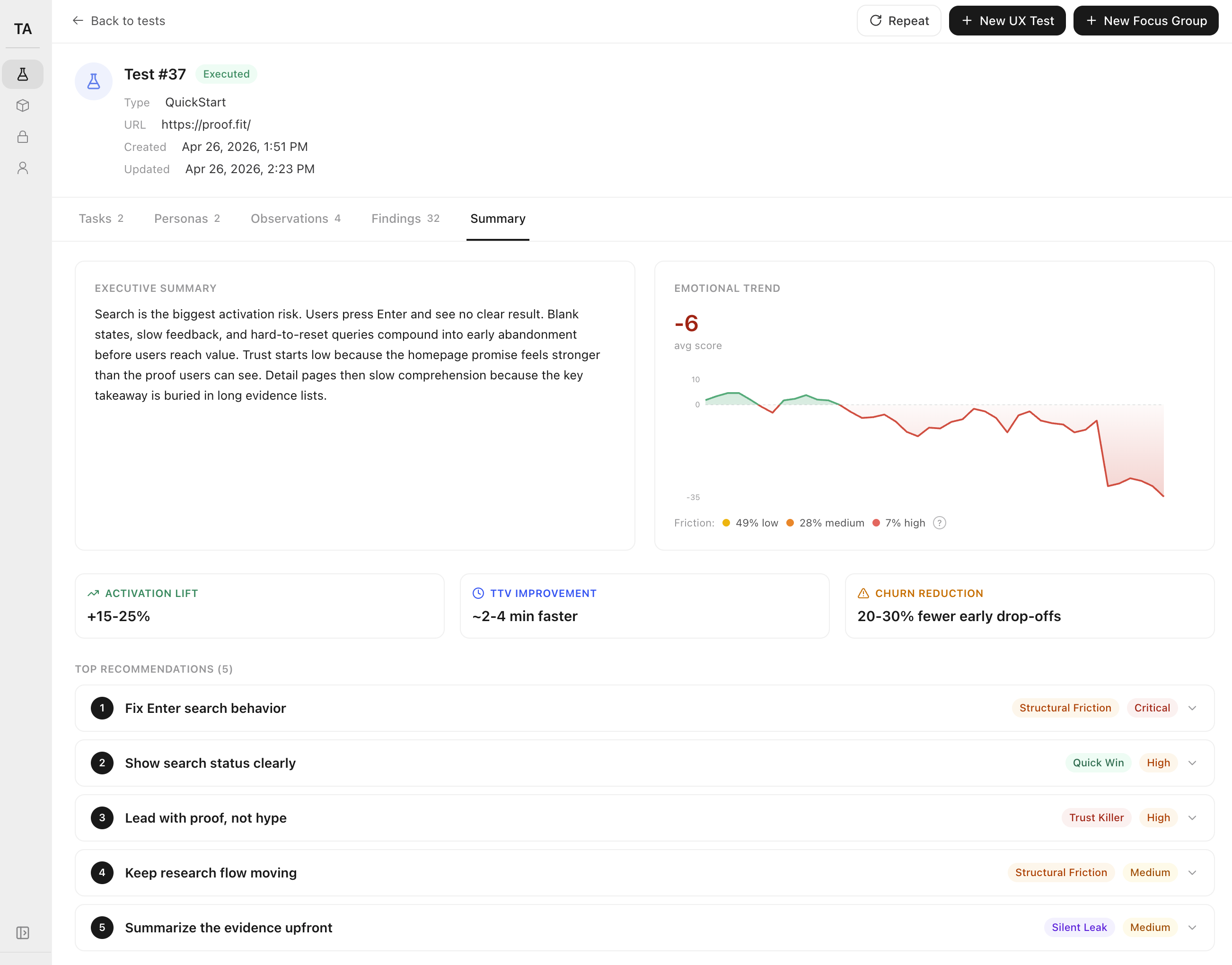
Drop your email. We reply within 24 hours, run a study on your page, and send you a 32-finding report — same shape as the one above.
Built for the moment before strangers see your page. No panel. No traffic. No users required.
§1 — Problem
You shipped the thing. It's live on a real domain. Tomorrow it goes on Product Hunt, in front of the first cold DM, or out to your first $200 of paid traffic. Right now, no stranger has ever opened it. So you do what every solo founder does:
Two reply "looks great!" without clicking. One never replies. You learn nothing.
Twelve hours later, two strangers tell you to change the font color. The signup flow they never reached is still broken.
Sessions: 47. Activations: 1. You have no idea which step lost the other 46.
You don't have a UX team. You don't have users. You have a launch in 14 hours and a gut feeling that something on the page doesn't read.
§2 — Solution
We run AI users against your page in a real Chrome instance. Each one has a persona, a job-to-be-done, and a checklist of the things real users trip over. They click, scroll, narrate what they expect, and tell you exactly where they got lost.
Any public URL the agents can reach over HTTP. No SDK, no install, no DNS changes — paste, and they're already loading the page.
"Sign up for the trial." "Buy the $29 plan." "Understand what this product does in 30 seconds." Whatever the visitor is supposed to do, the agents try to do.
A ranked list of findings — severity, heuristic, the exact step it broke, the agent's own words. Public share URL included, so you can paste it into your build-in-public thread.
§3 — Features
Not an LLM summary of your page. Real agent runs in a real browser, narrated step by step, ranked against Nielsen's 10 heuristics, traceable down to the click.
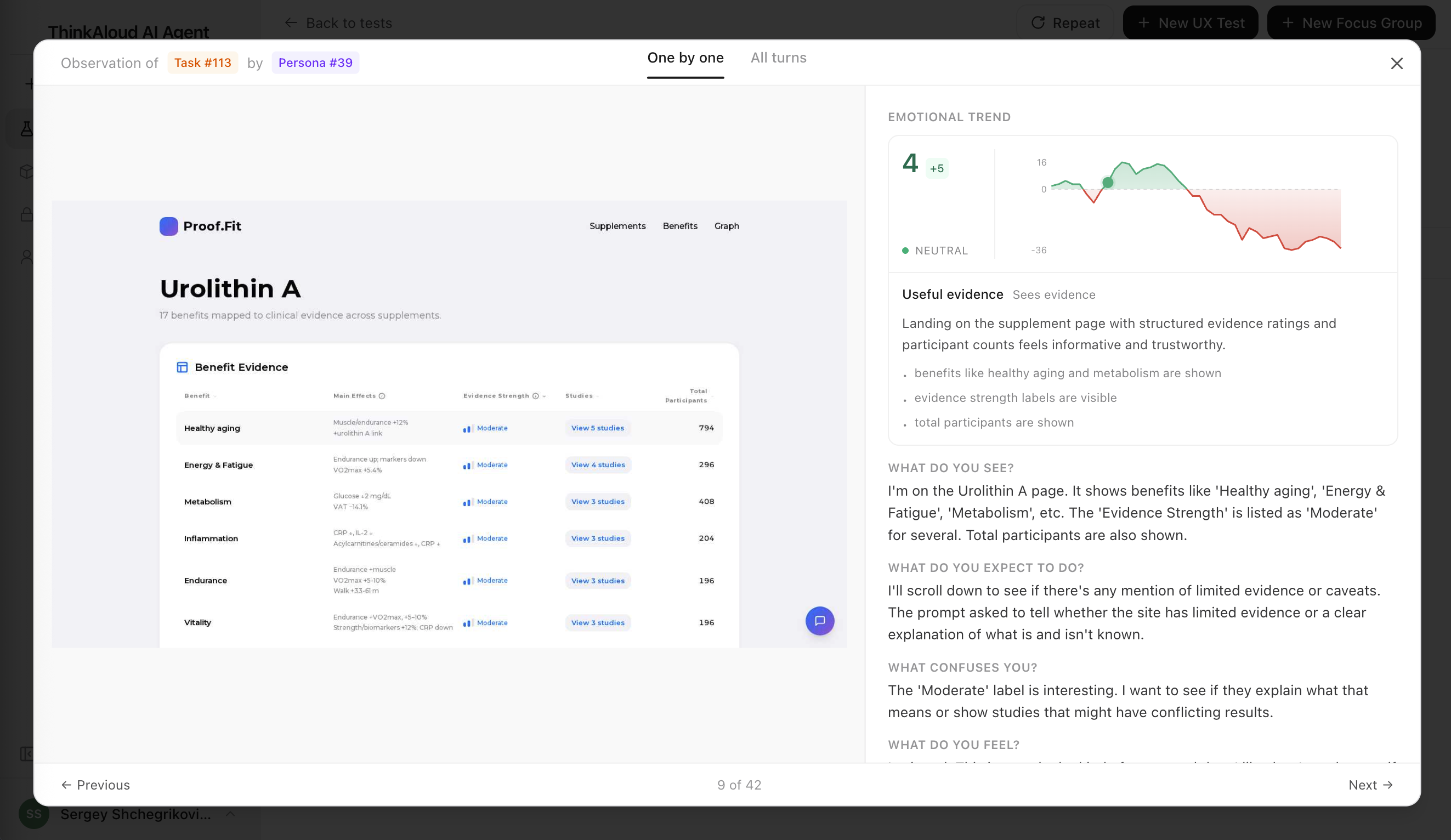
Every agent drives a real headless Chrome — not a screenshot, not a text abstraction. They render your JavaScript, hit your real CTAs, and get stuck on the same broken modal a human would.
You see the literal page they're on at every step, side by side with what they thought they were looking at.
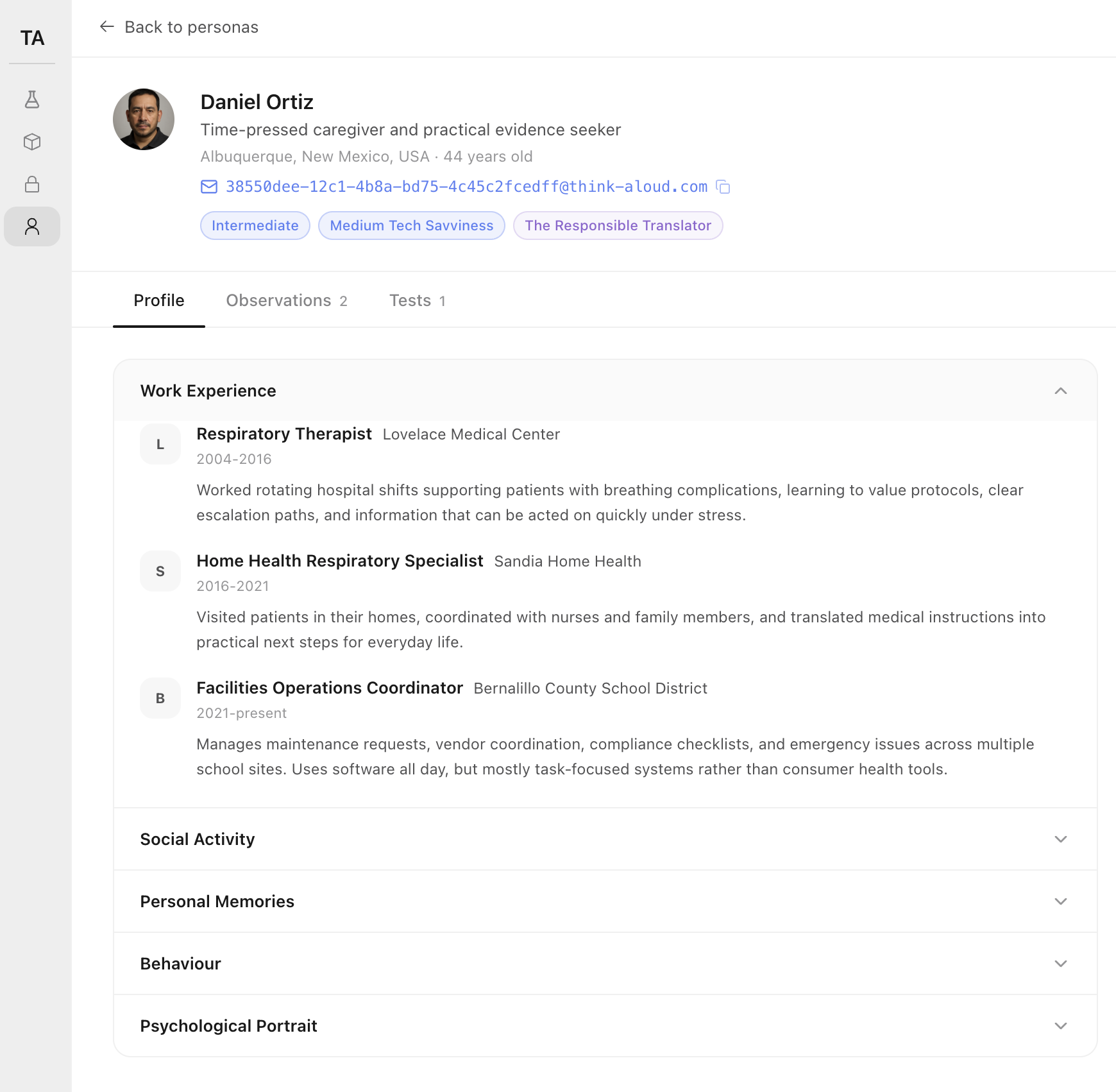
Each AI user is a profile-driven character — name, role, prior employers, tech-savviness, behavioural notes. A solo founder skimming a pricing page does not click the same buttons a designer testing a sign-up flow does.
When a finding fires for one persona but not another, you know whether you broke the page for everyone — or just for your CFO.
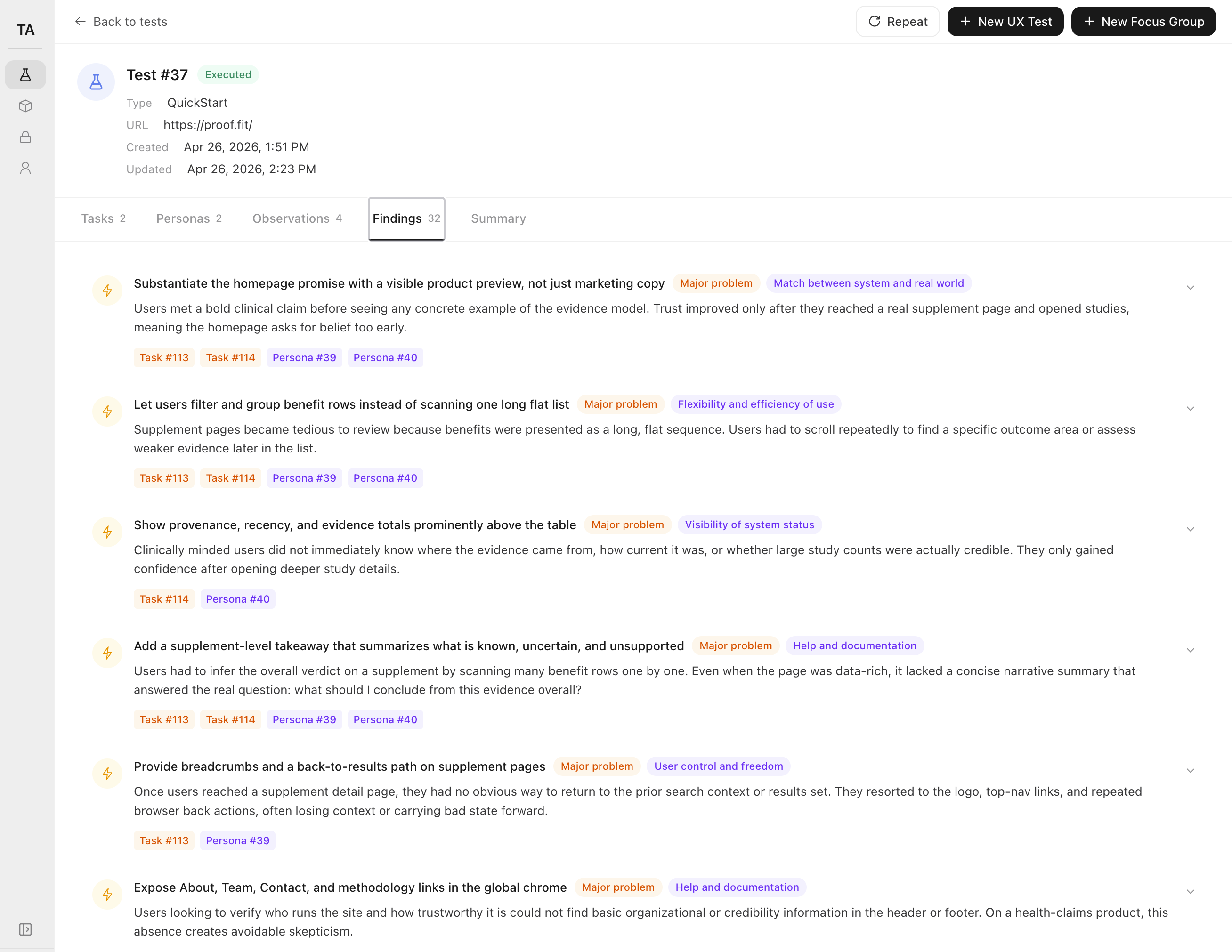
Every finding is tagged with severity (Critical · Major · Moderate), the Nielsen heuristic it violated, and the specific tasks and personas that surfaced it. No vibes, no "the page feels off" — a defensible to-do list you can paste into Linear.
Click any finding, jump to the exact agent step that triggered it.
§4 — Benefits
The deliverable is not the report. It's the four hours of "is this thing OK?" you stop spending on Sunday night.
You ship the launch with the obvious bugs already gone. The agents drive a real Chrome, so they catch the broken-modal-on-mobile and the silent-button-after-click that an LLM-of-the-page would never see.
Your hero converts the buyer, not just the lurker. Because each AI user has a real profile, you can tell when the pricing copy reads to a CFO but not to a designer — and fix it before you find out from a refund.
Paste the top five into Cursor and ship them before bed. Every finding is severity-ranked and tagged with the rule it broke, so launch morning is rewriting copy, not rewriting the funnel.
§5 — Proof
Three pre-launch operators ran their site through it last week. Here's what they said the morning after.
"I used to spend Sunday nights staring at PostHog with two signups and zero data. Last week I ran the page through 20 AI users before launch day — got 32 ranked findings before my second coffee. Fixed the four Criticals, shipped at 8am, woke up to my best launch yet."

Anna Kowalski
Solo founder, AI weather app · vibe-coded with Cursor
"How did we ever ship a pricing page without this? Five minutes of fixes before deploy beats three weeks of staring at a tanked funnel."

Diego Almeida
Indie hacker, second SaaS · founder-engineer
"Honestly? It's the first tab I open on a Sunday now."

Maya Chen
Building in public · second product
Each agent runs in a real headless Chrome — real DOM, real JavaScript, real rendering. Personas are generated with believable work history and behaviour so a CFO and a junior engineer don't click the same buttons. Every observation is scored against Nielsen's 10 heuristics, ranked by severity, and traced back to the exact step that triggered it. First report in under 10 minutes.
AI agents are not a replacement for real user feedback once you have users. They are the only option when you don't.
§6 — Why we built this
For the moment before strangers see your page — launch night, the next deploy, the Monday-morning client kickoff.
Run your first study§7 — Try it
Three findings from a recent pre-launch run, swapped live. Your full report includes 32 like these — ranked, tagged, and traceable to the agent that found them.
After clicking "Start free trial," the agent waited 4 seconds with no spinner or URL change. It clicked twice more, assumed the button was broken, and closed the tab.
The agent expected the middle pricing card to call out a specific feature. It saw "Everything in Starter, plus more" and bounced to the FAQ looking for a real comparison.
The "$29/mo" only appears after switching from "Annual" to "Monthly." Most agents never noticed the toggle and reported the product as $290.
You just saw three findings from someone else's run. Want 32 like these on your own page? Run a study below.
§8 — Run your study
Drop your email. We'll reply within 24 hours to set up your study, then run it on your URL and email you a 32-finding report — same shape as the sample, your page, your goal.
§9 — Ship it ready
Don't post a URL no stranger has ever opened. Run AI users against it tonight, fix what they break, and walk into launch day with the obvious mistakes already gone.
Run your first study